Developer reference
MCP Server Reference
Manage social media posts from any MCP client (Claude Desktop, Cursor, ChatGPT, and others): connect accounts, upload media, publish or schedule posts, and read analytics on behalf of an authenticated Sharetopus subscriber.
Connection
Streamable HTTP, stateless. Clients on MCP protocol 2026-07-28 and on the 2025 revisions use the same URL; the legacy SSE transport is not served.
| Transport | URL |
|---|---|
| Streamable HTTP | https://sharetopus.com/api/mcp/mcp |
Authentication
Two independent paths resolve to the same authenticated principal. Pick the one your client supports.
| Method | How it works |
|---|---|
| API key | Send Authorization: Bearer stp_mcp_... on every request. Create the key at /integrations (shown once, up to 10 active keys, revocable from the UI). |
| OAuth 2.1 | OAuth-capable clients discover the auth server automatically via the RFC 9728 metadata endpoint at /.well-known/oauth-protected-resource and identify themselves with a client ID metadata document. No key needed. |
Plan requirement and limits
What gates a tool call before any business logic runs.
| Constraint | Value |
|---|---|
| Plan requirement | Creator plan or higher, for every tool |
| Tool calls | 100 per 60 seconds per user, across all tools; a call over the budget returns a tool error with the retry delay |
| Requests | 1000 per 60 seconds per IP; above that the endpoint answers HTTP 429 with Retry-After |
| Monthly quotas | Some tools carry monthly caps that scale with the plan tier; exceeding one returns an error naming the quota |
Client configuration
Claude and other OAuth-capable clients need only the URL and a sign-in. API-key clients send the key as a bearer token.
| Client | How to connect |
|---|---|
| Claude (web and desktop) | Open Customize > Connectors > Add custom connector, paste the URL, and click Add. Then click Connect and sign in to Sharetopus. |
| Claude Code | Run the command below. Then run /mcp and choose Authenticate. With an API key, add --header "Authorization: Bearer stp_mcp_YOUR_KEY" to the command instead. |
| Cursor | Add the JSON below to ~/.cursor/mcp.json, with a key created at /integrations. |
| Other clients | Clients that sign in with a client ID metadata document need only the URL; the sign-in flow starts automatically. The rest, including clients that only support dynamic client registration, send Authorization: Bearer stp_mcp_... on every request. |
claude mcp add --transport http sharetopus https://sharetopus.com/api/mcp/mcp{
"mcpServers": {
"sharetopus": {
"url": "https://sharetopus.com/api/mcp/mcp",
"headers": {
"Authorization": "Bearer stp_mcp_YOUR_KEY"
}
}
}
}Read tools
5 of the server's 10 tools.
| Tool | What it does |
|---|---|
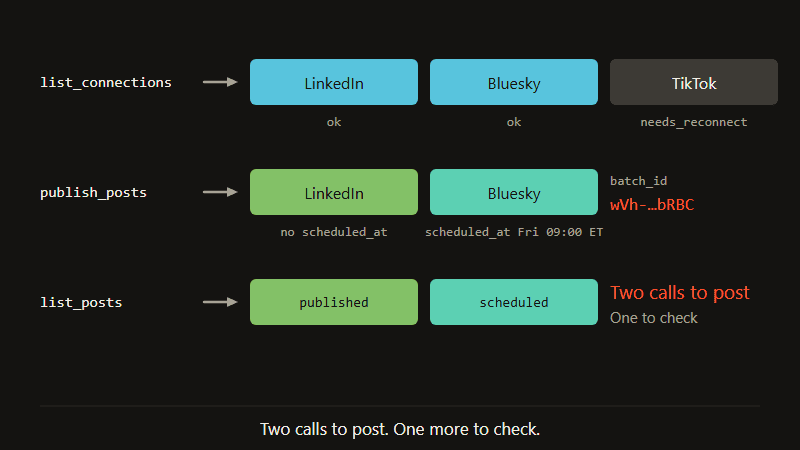
| list_connections | Your connected accounts with id, platform and status; an account in needs_reconnect status is fixed at reconnect_url. |
| list_pinterest_boards | The boards of a Pinterest account, paged with a bookmark cursor. |
| list_posts | Posts by status (upcoming, published, failed, cancelled), or every post of one publish_posts call by batch_id. |
| list_billing_summary | Your plan, its status, and this month's calls of each capped tool against its limit. |
| get_account_analytics | Daily views, likes, comments, shares and subscribers for your content; up to 24 hours old. |
Media tools
2 of the server's 10 tools.
| Tool | What it does |
|---|---|
| attach_media_from_url | Copies an image or video from a public URL into storage and returns its storage_path. |
| request_upload_url | A signed URL to PUT a local image or video; returns the storage_path to post it. |
Posting tools
3 of the server's 10 tools.
| Tool | What it does |
|---|---|
| publish_posts | Publishes or schedules 1 to 30 posts in one call: scheduled_at schedules a post, no scheduled_at publishes it now. |
| update_scheduled_posts | Cancels, resumes or reschedules up to 50 scheduled posts. |
| delete_scheduled_posts | Permanently deletes up to 50 scheduled posts. |
Prompts (3)
Reusable message templates invocable from the client's prompt picker; each returns structured messages that guide the agent through a workflow.
| Prompt | What it does |
|---|---|
| plan_week_for_platform | Plan a full week of content for a specific social platform around a chosen theme. |
| repurpose_post | Repurpose an existing post for other social platforms with platform-specific adaptations. |
| audit_calendar | Review your next 14 days of scheduled posts. Checks for gaps, clustering, and platform balance. |
Typical flow
A text post takes two calls; media adds one. The server sends the same guide to every client when it connects.
| Step | Tool | Purpose |
|---|---|---|
| 1 | list_connections | Take the account ids (platform and status come with them) |
| 2 | attach_media_from_url | Only for an image or video (or request_upload_url for a local file); returns storage_path |
| 3 | publish_posts | One entry per account; scheduled_at schedules a post, no scheduled_at publishes it now |
| 4 | list_posts | Pass the returned batch_id to see what happened to each post |